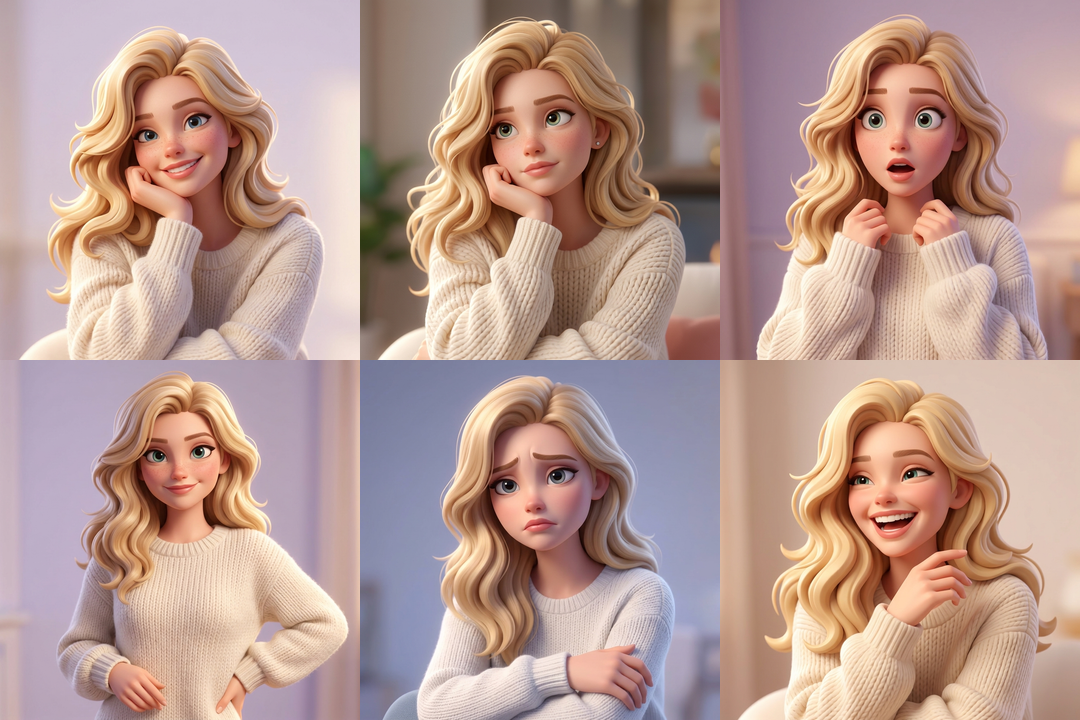
Read the submitted test instruction
Use only the central fictional adult blonde woman in the reference. Keep her recognizable face, wavy blonde hair and white knit sweater. Ignore surrounding sample cards and lettering. Use even lighting, a simple background and comparable framing. Follow the requested expression, view or scene without turning her into a different person.
The isolated Kie/SeeAPI acceptance rechecked existing outputs under the revised safety policy, preserving the original image bytes. The selected style and each expression or view description were added by the studio. This exact test used a homepage composition with one fictional central subject; use a clear photo of one person for your own request.
Review the mood and the character separately.
In the recorded set, Surprised has an open mouth and widened eyes; Laughing shows an open smile. Confident is subtler. Decide whether each mood is distinct enough for your use.
01 · Choose a reference with useful detail
Use an image you own or have permission to edit. Choose one clear subject, an inspectable face, even lighting and enough visible hair and clothing to compare the results. A clear subject reference is more useful than a distant small face in a busy scene.
A neutral or gently smiling reference gives you visible identity cues to compare. This is input-selection advice, not a measured guarantee that a particular expression will work better.
Read the first-image guide02 · Upload, adjust once and choose a style
- Choose Create character and upload first. JPG, PNG or WebP, up to 10 MiB (10,485,760 bytes) and at most 8 megapixels. Naming is optional when starting; a name is required when saving to My characters.
- Adjust the reference once. Position, crop, rotate and choose the output size, then confirm. Cancelling a replacement crop keeps the previous reference; an unconfirmed replacement does not overwrite it.
- Choose a style in the workspace. Keep the same medium across the set so you can compare the images. You can also start from a saved character reference.
03 · Select Expressions in More options
Expressions requests Happy smile, Thoughtful, Surprised, Confident, Sad and Laughing. You can edit each default description. Review all six separately; one successful expression does not prove that the whole set preserves identity.
Use the selected reference and style. Keep the visible face shape, hairline, hairstyle and clothing recognizable. Change only the requested expression, with even lighting, a simple background and comparable portrait framing.
Suggested instruction, not the exact tested prompt. The recorded output above has its own submitted instruction.
04 · Check credits, then submit
6 expressions × 4 credits per image.
The one-time 4-credit starter allowance covers one standard image, not this set.
Check the selected operation and its total in the workspace before submitting. Confirm that you have permission to use the reference. A set reserves 24 credits; each successful image consumes 4 credits. Use Create character to enter the actual upload and crop flow, then open More options to select the creation type.
05 · Review the character expressions and any partial failure
- Expression: Is the requested mood readable and distinct from the other expressions?
- Identity: Compare face shape, hairline, hairstyle and visible distinguishing details with the reference.
- Light and composition: Look for major lighting shifts, clipped features and inconsistent framing.
- Task state: Inspect each child image. A confirmed failed child releases its reserved 4 credits; successful children remain charged.
- Happy smile Succeeded4 credits consumed
- Thoughtful Succeeded4 credits consumed
- Surprised Succeeded4 credits consumed
- Confident Succeeded4 credits consumed
- Sad Succeeded4 credits consumed
- Laughing Failed4 credits released
Illustration: 5 succeeded, 1 failed → 20 credits consumed; 4 released. Keep the successful images and check the failed child separately.
If the provider result or settlement is unclear, use Check task status and review the job before submitting again. Reserved credits may remain while recovery is needed; an unknown state does not guarantee an immediate release. For help, include the task ID and the visible status.
Read credits and job answers06 · Download the character expressions you want to keep
Open each successful creation, inspect the full image and download the versions you want to keep. A partly failed set still has usable successful images. Downloading an existing result does not consume generation credits; a new generation is a separate job with its own cost.
Generated versions are accessible in the workspace for 30 days. That access window is not a promise of physical file deletion. A saved main reference remains subject to character-space entitlement. After a downgrade, extra character spaces enter a 30-day read-only period.